Understanding IP Subnetting: A Visual Guide by George Ou
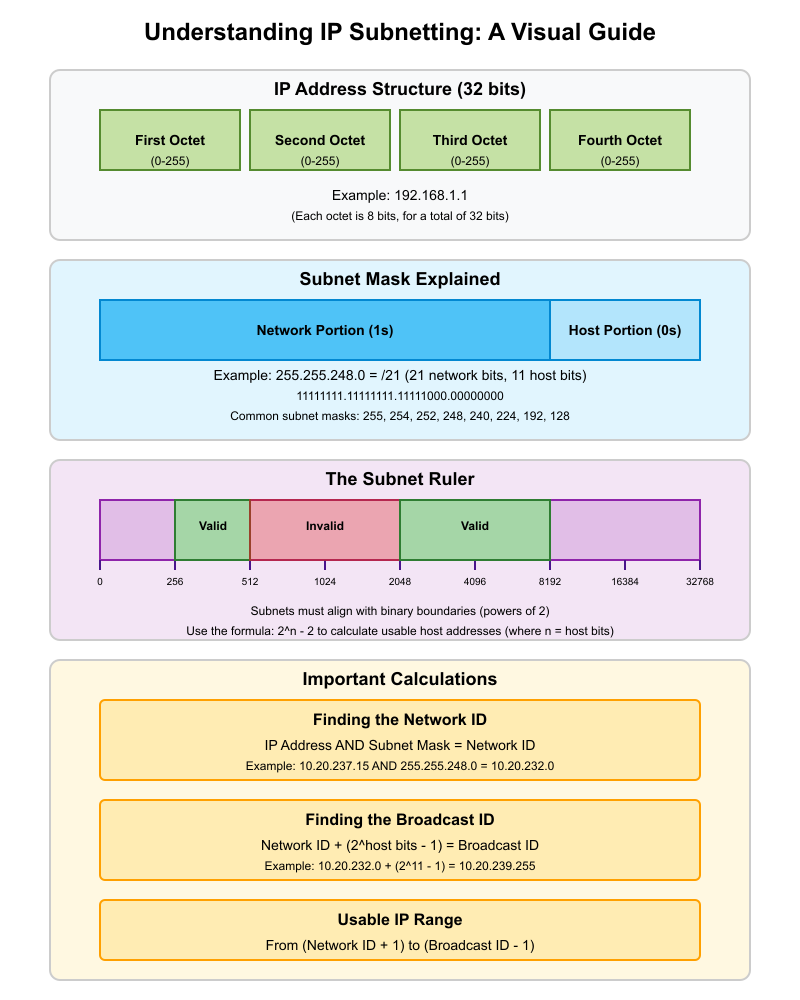
George Ou presents IP subnetting using a unique graphical method. It’s an excellent primer for students new to networking and a useful refresher for seasoned professionals.
Why Subnetting Matters
IP subnetting is a core concept in networking, essential for any IP network engineer. Yet, many students find it difficult to grasp due to the abstract nature of binary math and subnet masks. Over the years, I’ve seen students struggle unnecessarily because subnetting wasn’t explained in an intuitive, visual way. To address this, I developed a graphical method and shortcut techniques using a calculator. This article is a result of that experience.
What Are IP Addresses and Subnets?
Though “IP” stands for Internet Protocol, it’s used in networks of all sizes—from small private networks to the global Internet. An IP address is a 32-bit number that uniquely identifies a device on a network. While the full 32-bit range allows for about 4.3 billion unique addresses, these are typically represented in four 8-bit segments (octets), written in decimal form and separated by periods (e.g., 192.168.1.1). Each octet can range from 0 to 255.
For example, IP addresses increment as follows:
python-replCopyEdit0.0.0.0
0.0.0.1
...
0.0.0.255
0.0.1.0
...
255.255.255.255
A subnet, or sub-network, is a smaller, logical division of a larger IP network. The smallest subnet that doesn’t contain further divisions is called a broadcast domain, often equivalent to a single LAN segment on an Ethernet switch. Within a subnet, devices communicate using MAC addresses, which do not travel across subnets or the wider Internet. This limitation is due to MAC address communication relying on broadcast traffic, which does not scale efficiently.
To manage broadcast traffic, networks are divided into subnets. The smallest common subnet uses 8 bits (one octet), though this can vary depending on design needs.
Network ID and Broadcast ID
Each subnet has a starting and ending address:
- The first address is the Network ID.
- The last address is the Broadcast ID.
These addresses are reserved and cannot be assigned to devices. The Network ID defines the subnet, while the Broadcast ID is used to send messages to all devices within that subnet. Any time you refer to a subnet, you specify its Network ID and its subnet mask, which determines its size.
Visualizing Subnets: The Subnet Ruler
To make subnetting easier to understand, I created a graphical subnet ruler. Many IT students struggle with binary math, so this visual tool helps bridge that gap.
Consider the range from 10.0.0.0 to 10.0.32.0. Note that 10.0.32.0 is the start of the next subnet, so this subnet ends at 10.0.31.255.
As you move from left to right on the subnet ruler, each tick represents a doubling in subnet size:
- 8 bits → 256 total IPs → 254 usable hosts (excluding Network and Broadcast IDs)
- 9 bits → 512 total IPs → 510 usable hosts
- 13 bits → 8,192 total IPs → 8,190 usable hosts
To calculate usable hosts:
CopyEdit2^n - 2
Where n is the number of host bits.
Learning to Subdivide Subnets
Subnets can be further divided, but only along binary boundaries. You cannot randomly choose start and end points. The subnet ruler helps visualize valid subnet sizes.
In Figure B (not shown), green blocks represent valid subnets, and red blocks represent invalid divisions. Each valid division aligns with binary increments. The visual format helps you spot incorrect subnetting at a glance.
The Role of the Subnet Mask
The subnet mask defines how large a subnet is. Common subnet mask values include:
CopyEdit255, 254, 252, 248, 240, 224, 192, 128
These values appear frequently in IP networking and are worth memorizing.
Subnet masks consist of a sequence of 1s followed by 0s in binary:
- The 1s represent the network portion
- The 0s represent the host portion
For example, a subnet mask of 255.255.248.0 in binary is:
CopyEdit11111111.11111111.11111000.00000000
This is a /21 subnet (21 bits for the network).
Why It’s Called a “Mask”
The term mask refers to how a subnet mask is applied to an IP address using the AND operation. This operation filters out the host bits and leaves only the Network ID.
Example:
Given:
- IP:
10.20.237.15 - Subnet Mask:
255.255.248.0(or/21)
Binary ANDing these values reveals the Network ID as 10.20.232.0.
You can also do this using the Windows Calculator without converting to binary:
- Enter
237, pressAND, enter248→ Result:232
So, the third octet of the Network ID is232.
This method is fast, accurate, and avoids tedious binary conversions.
Calculating the Broadcast Address
Once you know the Network ID and the subnet size (in bits), you can calculate the last address (Broadcast ID) by adding the number of addresses and subtracting one.
In our example:
/21subnet = 11 host bits → 2^11 = 2,048 addresses- Broadcast address:
10.20.239.255
Conclusion
Subnetting doesn’t have to be confusing. With graphical tools like the subnet ruler and shortcuts using the AND operation, you can quickly identify subnets, Network IDs, Broadcast IDs, and host ranges—without drowning in binary math. Mastering these concepts is critical for anyone working in networking or IT infrastructure.

 Mattdotvu
Leave a comment