I’ve been reflecting lately and I want to share something with other admins and members about how I run our Facebook group, YTS.
Running a group like this comes with real responsibility, and I believe that all group admins need to improve how we manage things — not just for control, but for safety.
Why This Matters – Admins Can Be Held Liable
Under the Vanuatu Harmful Digital Communications Act, Facebook admins can be held legally responsible for harmful or defamatory content shared by group members. That means:
If someone posts something harmful in your group — and you don’t take action — you could be held accountable in court.
That’s why I believe it’s so important that we, as admins, step up our efforts to create safe, respectful spaces.
Step 1: Use Your Group Settings – Set the Rules
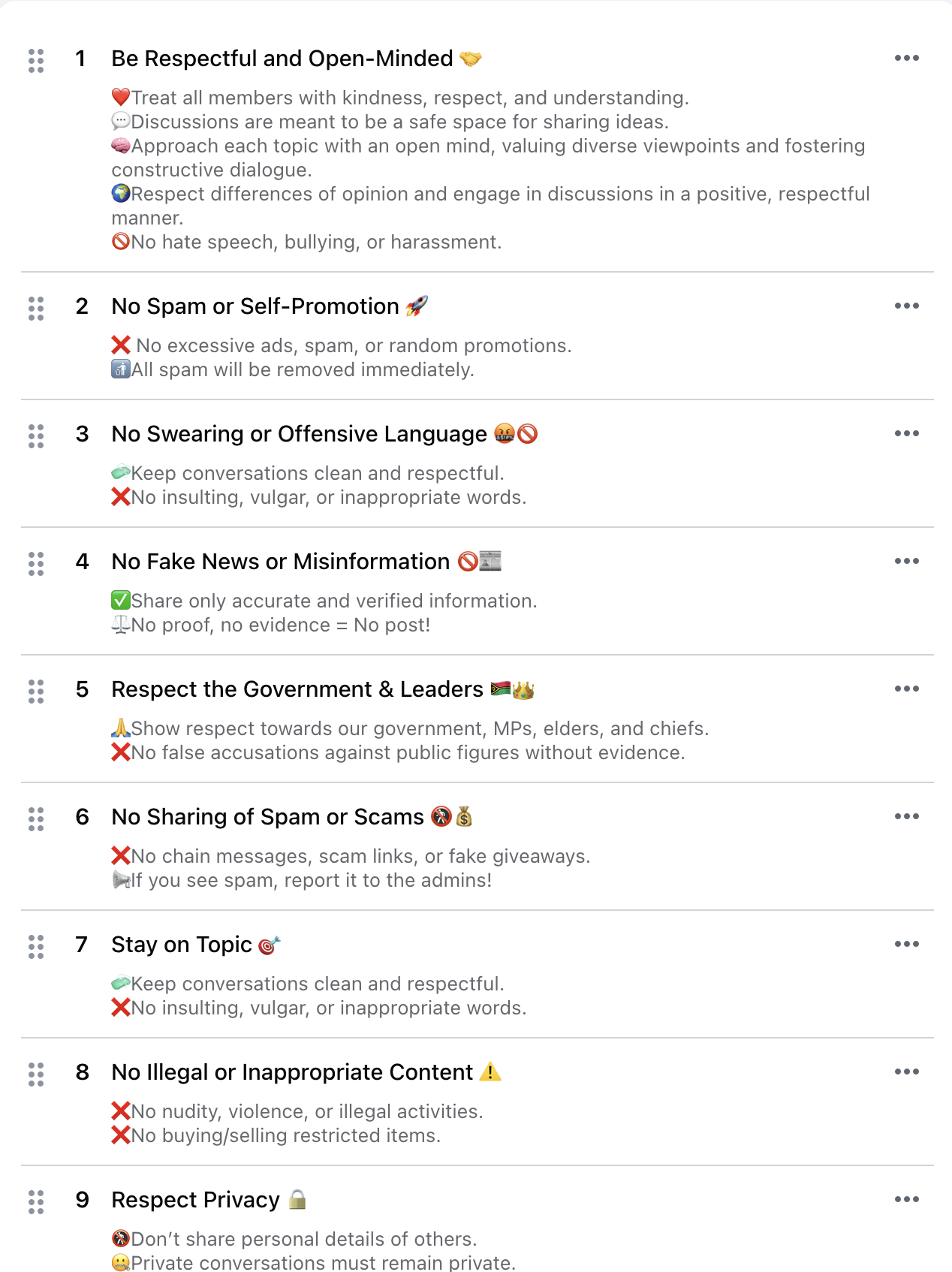
Go into your Facebook Group Settings and set your House Rules:
- No swearing or abuse
- No false information or threats
- No sharing private information
- Respect the government, elders, and one another
Once rules are published, they give you clear authority to take action when a member breaks them — whether that’s a warning, suspension, or removal.
Step 2: Enforce the Rules – Protect the Group
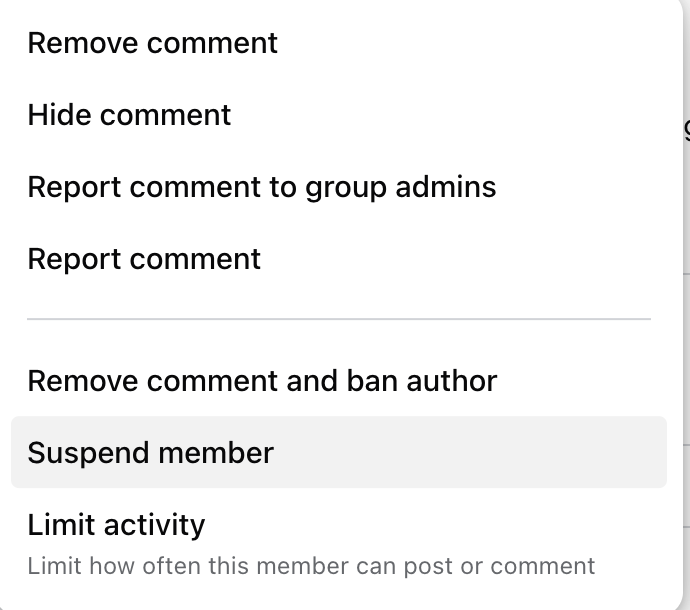
If someone posts something inappropriate:
- Click their name
- Choose “Remove” or “Suspend”
- Facebook will notify them why based on the rules you created
So it’s not just you acting randomly — it’s part of a structured and visible group policy.
Step 3: Set Participation Questions to Protect the Group
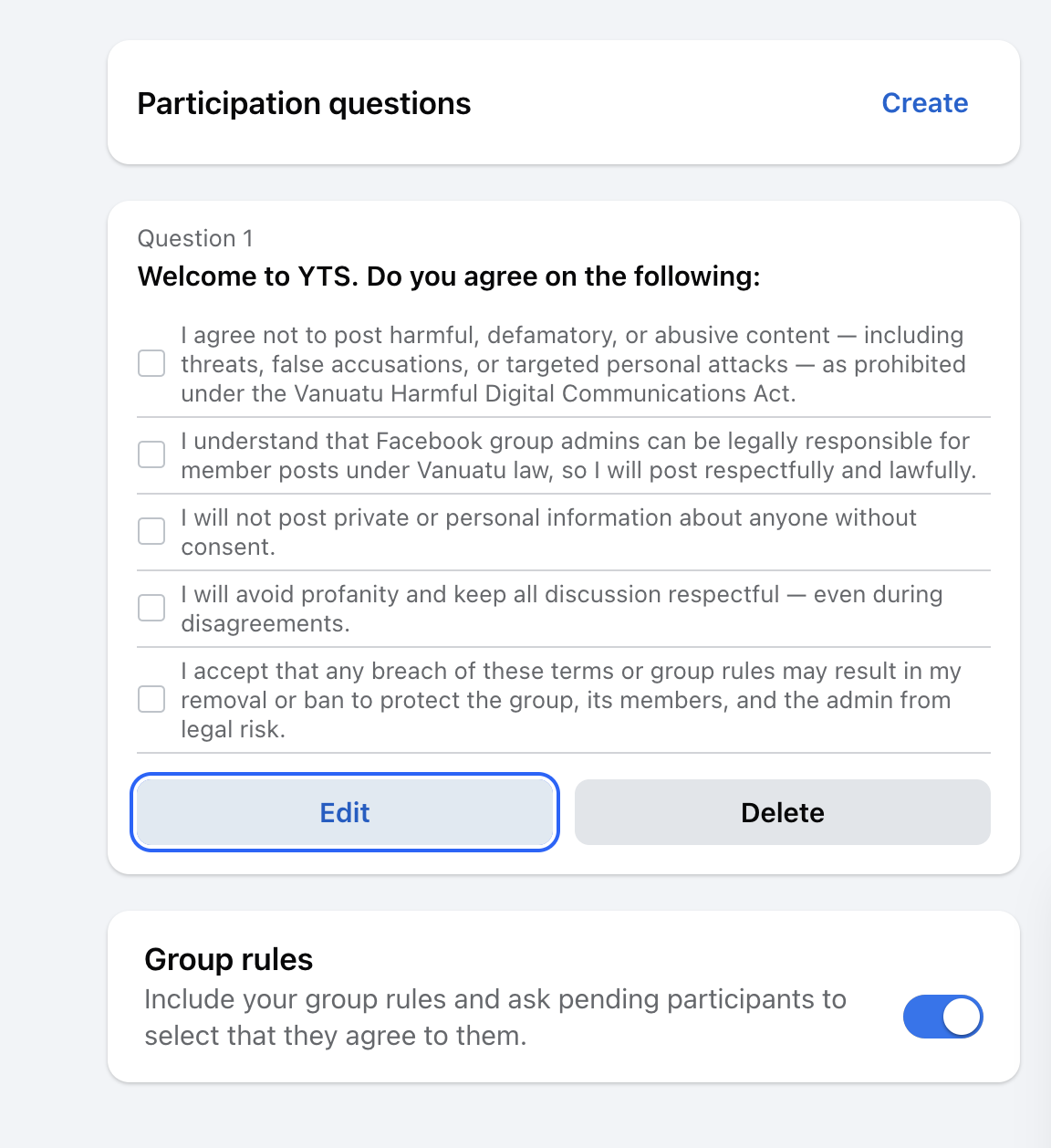
Go to Group Settings > Participation Questions
Add a question like:
“Welcome to YTS. Do you agree to the following:”
- I agree not to post harmful, defamatory, or abusive content — including threats, false accusations, or targeted personal attacks — as prohibited under the Vanuatu Harmful Digital Communications Act.
- I understand that admins can be held legally responsible for member posts, so I will post respectfully and lawfully.
- I will not share private or personal information without consent.
- I will avoid profanity and keep all discussions respectful.
- I accept that breaking these rules may result in removal or ban to protect the group and the admin.
This helps you prove that every member voluntarily agreed to behave lawfully and follow your group rules — which strengthens your legal defense as an admin.
Step 4: Add Filtered Words to Catch Harmful Content Automatically
Go to your Facebook Group Admin Tools → Moderation Alerts
Use the Keywords feature to automatically flag posts or comments that contain:
- Swear words
- Offensive slurs or vulgarity
- Sexual or derogatory terms
- Anything that may violate the Vanuatu Harmful Digital Communications Act
As shown in your screenshot, include common variations, misspellings, or slang so you don’t miss harmful content.
Step 5: Add Filtered Texts That Automatically Block Comments
In addition to moderation alerts, you can configure Facebook’s content moderation tools to block certain words, phrases, or expressions completely. When a member uses one of these blocked words in a comment, Facebook will automatically prevent the comment from being published.
How to Set This Up:
- Go to Admin Tools > Moderation Alerts > Edit Keywords
- Add a list of filtered words or phrases that are:
- Offensive or vulgar
- Sexually explicit
- Hate speech or discriminatory
- Violations of your group rules or Vanuatu law
This goes further than just alerting you — it prevents the harmful comment from being seen at all.
Examples of What to Block:
- Swear words or slurs
- Local variations of profanity or insults
- Sensitive terms that often lead to fights, harassment, or defamation
You can also block phrases like:
- “kill yourself”
- “you’re a liar”
- “you’re corrupt”
- “this admin is stupid”
Use caution and update your blocklist regularly. Be specific but not overly broad, so you don’t block normal conversation by mistake.
Why It Matters:
Blocking known harmful text phrases helps reduce the risk that your group will become a space where abuse or defamation happens — and it shows that you are actively trying to prevent harm, in compliance with the Vanuatu Harmful Digital Communications Act.
Step 6: Use Facebook’s Built-In Profanity Filter for Pages
If your Facebook Group is linked to a Page (or you’re managing a Page separately), you should also turn on the built-in profanity filter. This automatically hides comments that contain offensive language — without needing manual moderation.
How to Turn It On:
- Log into Facebook and click your profile photo at the top right.
- Click See all profiles, then select the Page you want to manage.
- Click your Page photo at the top right, then click Settings & Privacy.
- Click Settings, then go to Followers and public content.
- Find the setting “Hide posts and comments with profanity” and click the Toggle switch to turn it on.
Why It Matters:
This adds an automatic layer of protection that works 24/7, even when admins aren’t online. It supports your obligation to filter and remove harmful content under the Vanuatu law and helps preserve a respectful group environment.
Conclusion: Making Social Media Safe, Responsible, and a Tool for Nation Building
As Vanuatu’s digital presence continues to grow, it’s essential that social media — especially Facebook groups — is used for positive, lawful, and constructive purposes. Platforms like Facebook should be more than just entertainment. They can be powerful tools for education, community dialogue, democratic engagement, and national development.
However, these benefits only come when digital spaces are well-managed and safe.
Under the Vanuatu Harmful Digital Communications Act, Facebook group admins are no longer just moderators — they are legally accountable for what happens inside their groups. Harmful, defamatory, or abusive content, if not addressed, can expose admins to serious legal consequences.
This means that every admin has a duty to take proactive steps to:
- Set and enforce clear rules
- Filter and moderate harmful content
- Prevent abuse, harassment, and misinformation
- Promote respectful and informed discussion
Done properly, this is not just about avoiding legal risk — it’s about building something better.
Social media in Vanuatu has the potential to:
- Give citizens a voice in democracy
- Enable public policy discussions
- Share educational content and local knowledge
- Support youth, business, culture, and creativity
- Strengthen unity across diverse islands and communities
When we uphold our responsibilities as admins and digital leaders, we help ensure that our online spaces reflect the values we hold dear as a nation — respect, accountability, and progress.
Let’s work together to make Vanuatu’s digital future strong, safe, and empowering for all.
YTS isn’t just a Facebook group — it’s a community. Let’s take care of it together.
 Mattdotvu
Leave a comment